


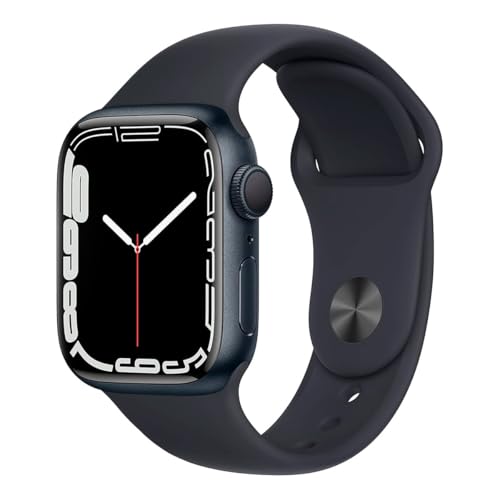
Small text and cluttered digital complications often make glancing at a wrist display frustrating during busy days or outdoor walks. Picking an easy to read apple watch setup solves this struggle by pairing a bright, high-contrast screen with clean digital dials. Modern watchOS software allows users to scale text size, bump bold fonts, and prioritize oversized numbers over crowded widget grids. If you already browse readable watch dial options for clinical clarity or outdoor work, digital screens bring even more flexibility for daily legibility.
Hardware selection matters just as much as on-screen software tweaks. Pairing an accessible smartwatch like the Apple Watch SE 3 [GPS 40mm] with readable instruction references or alternative straps like the Arm/Ankle Band Compatible with Apple Watch 38mm creates a tailored setup that reduces physical eye strain. Many users combine these devices with dedicated reference books like the Apple Watch Series 8 User’s Manual or Apple Watch For Seniors For Dummies to master accessibility zooms and large numerals quickly. A clear display transforms a standard wearable into an effective smart watch for productivity, letting you check essential metrics in seconds without squinting.

Pros
- Allows uninterrupted heart rate and workout tracking when wrist gear or wraps interfere
- Breathable, soft nylon material prevents sweat buildup and skin pinching
- Generous length supports flexible placement on the forearm, bicep, or lower leg
- Quick hook-and-loop fastening system makes size adjustments simple and fast
Cons
- Glancing at notifications or checking the watch face is less convenient than standard wrist placement
- Nylon hook-and-loop fabric can gather lint over extended use and may require regular cleaning
The Straplanet Arm and Ankle Band is a specialized smartwatch accessory designed to liberate your Apple Watch from your wrist. While traditional wristbands serve everyday office wear and casual outings well, high-intensity athletic activities often make wrist-worn devices impractical. This extended nylon band allows users to mount their Apple Watch securely around the bicep, forearm, or ankle, ensuring continuous activity and biometric tracking without interfering with wrist wraps, gloves, or protective gear.
This accessory is particularly well suited for combat sports athletes, CrossFit practitioners, weightlifters, and kettlebell lifters who frequently experience wrist collisions with equipment. It also serves professionals working in sterile clinical environments or food prep settings where bare-below-the-elbow hygiene policies prohibit wristwatches. Runners and treadmill walkers who prefer wearing their device on the lower leg for consistent step counts will also find value in the extended length.
In terms of real-world comfort and fit, the strap utilizes a soft, woven nylon construction that feels smooth against the skin. Unlike rigid silicone or stiff leather, the porous fabric allows perspiration to evaporate during intense training sessions. The wider band profile plays an important role here, spreading tension across a broader surface area so the band stays firmly anchored without digging in or cutting off circulation. Measuring approximately 16.1 inches in total length, it easily accommodates limbs measuring between 7.5 and 15.75 inches in circumference.
Build quality and practicality center on ease of use. Connecting your Apple Watch module is straightforward, threading into the compatible connectors to maintain reliable sensor contact against your skin. The reinforced hook-and-loop fastener creates a firm hold that remains closed through vigorous running, jumping, and lifting movements. The hardware is designed to pair seamlessly with standard Apple Watch cases as well as rugged titanium Ultra models.
There are practical tradeoffs to keep in mind with off-wrist positioning. Checking split times, reading incoming text messages, or operating the touchscreen requires extra effort when the watch sits on your bicep or ankle. For focused workout sessions and work shifts where data collection is the priority over screen interactions, this affordable strap is a reliable and practical addition to any smartwatch owner's fitness kit.
Wearing a smartwatch on your upper arm or lower leg requires an even, forgiving fit that moves naturally with expanding muscles. The woven nylon construction offers a gentle degree of give, flexing slightly during heavy curls, squats, or sprints to maintain continuous comfort without slipping.
The hook-and-loop surface provides micro-adjustability, allowing you to dial in the exact tension needed to keep the optical heart rate sensor flat against your skin. Because the nylon weave breathes well, it avoids the moisture trapping and chafing often experienced with solid silicone bands during hot and sweaty workouts.
This arm and ankle band excels in athletic training environments where standard wristbands create obstacles. Boxers and kickboxers can tuck their smartwatch safely inside an upper-arm band beneath clothing, keeping track of heart rates without getting in the way of boxing gloves or hand wraps.
It is equally useful for nurses, doctors, and laboratory staff who need to monitor shift activity while abiding by strict sanitary standards that restrict wrist jewelry. For outdoor cycling, climbing, or hiking, mounting the device higher on the arm keeps it protected from accidental scrapes against rocks or handlebars.

Pros
- Featherlight case design makes it one of the most comfortable smartwatches for 24/7 sleep tracking
- Vibrant Always-On OLED display eliminates the need for exaggerated wrist raises
- Fast charging drastically reduces downtime during morning routines
- Robust suite of safety tools including Crash Detection, Fall Detection, and Emergency SOS
Cons
- 18-hour standard battery life requires daily charging cycles unlike multi-day sports watches
- Requires an iPhone for initial setup and full ecosystem functionality
- Ion-X glass face is more susceptible to micro-scratches than sapphire crystal
The Apple Watch SE 3 occupies a sweet spot in modern horology, serving as an approachable, high-performance smartwatch built for modern daily routines. Housed in a refined 40mm Starlight aluminum case, this piece appeals directly to professionals, students, travelers, and fitness enthusiasts who demand connected utility without the bulk of oversized sport monitors. Its understated champagne-silver hue transitions gracefully from casual morning workouts to business-casual office environments.
On the wrist, the 40mm profile measures a modest 10.7mm in depth and weighs just 26.3 grams without the band. This compact footprint is particularly welcoming for smaller to medium wrist sizes, ensuring the watch sits flat without catching on shirt cuffs or jacket sleeves. The inclusion of an Always-On Retina display marks a substantial practical improvement for everyday timekeeping, allowing you to check the time or discreetly monitor incoming notifications during business meetings without needing to raise your arm.
Build quality remains crisp and functional. The aerospace-grade aluminum chassis features a smooth matte texture that resists fingerprints, paired with Apple's durable Ion-X front glass. The included Starlight Sport Band is crafted from high-performance fluoroelastomer with a secure pin-and-tuck closure that holds firmly during intense gym sessions. Furthermore, swimproof water resistance allows for reliable worry-free wear in the shower, rainstorms, or during pool laps.
Under the hood, the S10 SiP architecture provides brisk navigation and supports advanced health metrics. Beyond standard step counting and workout tracking, the watch incorporates temperature sensing for cycle insights alongside dedicated sleep tracking with sleep apnea notifications. Real-world battery longevity delivers around 18 hours of typical use, but the updated fast-charging architecture changes the ownership experience by supplying up to 8 hours of operational life in just a 15-minute top-up.
While traditional mechanical watch collectors may miss the tactile sweeping second hand and multi-year maintenance intervals, the SE 3 stands out as an exceptional daily utility timepiece. Its primary limitations center around iPhone exclusivity and the necessity for daily charging routines. For anyone seeking dependable timekeeping, active lifestyle tracking, and effortless smart connectivity wrapped in a compact package, this timepiece represents tremendous long-term value.
Weighing only 26.3 grams in its GPS configuration, the 40mm case feels practically weightless throughout long workdays and high-exertion workouts. The smooth curvature of the back sensor cluster sits comfortably against the skin without creating focal pressure points.
The included S/M Sport Band accommodates wrist sizes ranging from 130mm to 200mm. Its flexible fluoroelastomer construction breathes reasonably well during athletic output and stays completely secure thanks to the flush pin-and-tuck design.
The SE 3 is engineered for an all-day battery rating of 18 hours under typical usage scenarios, extending up to 32 hours when utilizing Low Power Mode. This accommodates a full day of notifications, gym workouts, and passive background health monitoring.
The standout improvement is its fast-charging capability. Using the included magnetic USB-C cable, the watch can jump to 80 percent charge in roughly 45 minutes, while a quick 15-minute charge delivers enough power for overnight sleep tracking.

Pros
- Clear layout tailored for beginners and seniors who prefer physical reading material
- Covers essential WatchOS 9 tools, health tracking features, and daily shortcuts
- Lightweight paperback format makes it easy to keep near your charging dock or desk
- Eliminates guesswork during initial pairing and everyday configuration
Cons
- Covers WatchOS 9 features, so subsequent watchOS updates may introduce slight interface differences
- Physical book format lacks live interactive video demonstrations found online
- Focuses primarily on Series 8 and basic setup rather than third-party app development
The Apple Watch Series 8 User Guide by Majosta is a dedicated reference manual written to bridge the gap between sophisticated smartwatch technology and daily usability. As smartwatches continue to incorporate intricate health sensors, workout tracking algorithms, and communication options, navigating the interface can feel overwhelming for first-time users. This physical paperback volume serves as a supportive desk reference, detailing how to properly configure the Apple Watch Series 8 running WatchOS 9 without frustration.
This manual is particularly well suited for seniors, beginners, and everyday wear users who appreciate having tangible documentation by their side. Rather than searching through endless online forums or tiny on-screen menus, readers can flip directly to specific troubleshooting topics or initial pairing walk-throughs. It also makes an exceptional companion present for gift buyers pairing a new wearable with an accessible guide that ensures the recipient gets immediate utility out of their timepiece.
In terms of real-world functionality, the text systematically breaks down key smartwatch capabilities. Readers learn how to adjust haptic feedback for wrist comfort, optimize screen brightness for daytime readability, and tailor daily activity rings to personal fitness levels. The guide also covers crucial safety settings such as crash detection and emergency SOS, ensuring wearers and their families can establish peace of mind from day one. In addition, practical recommendations help users manage notification alerts so their smartwatch remains helpful rather than distracting during office meetings or gym sessions.
The physical build of the guide is compact and practical, measuring 6 by 9 inches and weighing under a pound. Its flexible paperback binding lays open fairly flat on a desk, nightstand, or workbench, allowing users to follow along with both hands free to handle their watch and paired smartphone. While digital updates to WatchOS will eventually introduce minor visual adjustments over time, the fundamental operational layout, hardware button functions, and core navigation steps covered in this volume remain dependable foundations for long-term ownership.
Gifting a modern smartwatch often comes with a steep learning curve, especially for older relatives or individuals upgrading from a standard analog wristwatch. Bundling this physical user manual alongside an Apple Watch Series 8 provides the recipient with immediate confidence. The straightforward language removes tech intimidation and encourages new owners to explore health monitoring, fitness goals, and messaging tools at their own comfortable pace.
Because the book fits effortlessly inside a standard gift bag or package, it complements the sleek presentation of a new smartwatch unboxing. It serves as a thoughtful gesture that shows consideration for the recipient's daily comfort and long-term enjoyment of their wearable investment.

Pros
- Clear, beginner-friendly instructional format tailored specifically for older adults and non-technical smartwatch owners
- Spacious physical book dimensions make reading text and following step-by-step explanations easy
- Paperback binding makes it practical to keep open on a desk or nightstand while setting up your watch
- Removes guesswork from learning core Apple Watch functions, notifications, and settings
Cons
- Physical book weighing approximately 2.3 pounds makes it heavier than standard pocket quick-start guides
- Printed format cannot automatically update when Apple issues major seasonal watchOS software revisions
- Does not include digital interactive tutorials or hardware accessories in the package
Apple Watch For Seniors For Dummies, published by Wiley, is an instructional physical guide created specifically to help older adults and beginner smartwatch owners understand and operate their wearable devices. Rather than focusing on hardware components like chargers or protective cases, this resource serves as an educational companion. It addresses a common challenge among new smartwatch owners: figuring out how to configure complex digital watch faces, manage daily notifications, and make sense of wearable settings without feeling overwhelmed by technical jargon.
For real-world buyers, an instructional manual provides a level of patient guidance that on-screen menus often lack. First-time Apple Watch owners, seniors upgrading from traditional wristwatches, or family members setting up a smartwatch for an aging relative can use this book as a desktop reference. It helps users understand core day-to-day functionality, such as viewing incoming text messages, checking daily activity, and navigating the watchOS interface at a comfortable pace.
In terms of physical construction, the guide is published in a standard paperback format. The supplied product data lists dimensions of approximately 7.3 inches by 9.1 inches, with a thickness of roughly 0.7 inches. At a listed weight of approximately 2.3 pounds, the book has a substantial, textbook-style footprint. The larger page size is particularly helpful for readability, giving readers plenty of visual space to study explanations without struggling with cramped text.
Using a printed reference guide alongside an Apple Watch offers a distinct ownership advantage during setup and daily practice. You can place the book flat on a kitchen table or desk while keeping both hands free to interact with your watch face and digital crown. The physical book format avoids the frustration of trying to search for help on a tiny watch display or constantly toggling between support tabs on a paired iPhone screen.
A realistic limitation of any printed tech guide is the pace of software evolution. Apple releases major watchOS updates annually, which means menu layouts or specific feature paths may shift slightly compared to what is shown on the printed page. Additionally, with a weight of over two pounds, this is a hefty desk reference rather than a pocket-friendly travel booklet. Buyers should treat it as an educational starting foundation rather than a live, auto-updating digital manual.
For seniors, adult beginners, or thoughtful gift-givers seeking to remove the frustration from learning a new Apple Watch, Apple Watch For Seniors For Dummies represents a solid, approachable investment. It provides clear, structured explanations that help owners build confidence with wearable technology at their own pace.
This paperback guide is geared toward seniors, first-time wearable device owners, and adult children assisting older relatives with device setup. Because the book focuses on fundamental concepts within the Apple Watch ecosystem, it serves as a versatile reference regardless of whether the reader wears a standard GPS or cellular-enabled configuration.
Buyers should keep in mind that while foundational concepts such as notifications, navigation, and core apps remain consistent, printed references may not reflect the latest software changes introduced in newer watchOS revisions. It is best used as a patient introductory companion for mastering core smartwatch habits.
The supplied specifications identify this product as a physical paperback book published by Wiley. It measures approximately 7.30 inches in width, 9.10 inches in height, and 0.70 inches in depth, providing a generous surface area for easy reading.
With a recorded shipping weight of roughly 2.31 pounds, the guide is substantial and durable enough for regular desk or nightstand use. The paperback binding provides easy page turning while following step-by-step instructions beside your paired smartphone and watch.
Frequently Asked Questions
How do you make an Apple Watch display larger and easier to read?
Yes, you can increase text size, toggle bold text, and select minimalist faces with oversized numerals directly in watchOS settings. Users can also enable the Zoom accessibility feature in the companion iPhone Watch app to magnify screen sections with a quick two-finger double-tap. Just as custom designs optimize readability on an alternative watch face, choosing large digital dials on an Apple Watch keeps the time visible at a glance.
Does the Apple Watch SE 3 feature an Always-On display for quick viewing?
Yes, the Apple Watch SE 3 includes an Always-On display that lets you read the time without raising your wrist. This hardware feature keeps the digital face legible from subtle angles during desk work or meetings. It ensures essential metrics remain visible throughout the manufacturer-listed 18-hour battery life.
Can an Apple Watch band be worn on the arm or ankle instead of the wrist?
Yes, extended nylon straps such as the Arm/Ankle Band Compatible with Apple Watch 38mm accommodate limb circumferences from 7.5 inches up to 15.75 inches. This flexible positioning helps users who cannot wear wrist hardware due to skin sensitivities, work uniform rules, or athletic gear restrictions. The wide breathable band secures the sensor flush against skin for step and heart rate tracking.
What is the difference between GPS and GPS + Cellular for readability and connectivity?
Display legibility is identical across GPS and GPS + Cellular models, but connectivity depends on configuration. A GPS-only model requires a nearby connected iPhone or local Wi-Fi network to receive phone calls, text messages, and app notifications. Cellular-capable models require a separate active carrier service plan to manage independent calls and texts without an iPhone nearby.
Are printed beginner guides useful for setting up Apple Watch visual accessibility settings?
Yes, printed references like the Apple Watch For Seniors For Dummies and the Apple Watch Series 8 User’s Manual provide step-by-step guidance for configuring accessibility features. These manuals walk beginners through font adjustments, emergency SOS functions, and medical ID cards at a comfortable learning pace. Having physical instructions nearby prevents navigation confusion on the digital watch interface.




Write Your Review
No reviews yet. Be the first to share your experience!